How to Make a YouTube Video with AI: The 2026 Workflow
How to make a YouTube video with AI: the five-step workflow from idea to review, where human judgment stays in the loop, and what the tools cost per month.
AI can produce a YouTube video faster than most people can outline one. That is exactly why the workflow matters more than it used to. This guide covers how to make a YouTube video with AI in five steps: the idea, the script, the voice, the visuals and the review, with the checks at each step that keep the video worth watching. The rule running through all five is short: a person approves every part before anything goes live.
The screens below are real captures from the Unfaced studio and the video in the script section is a finished demo made with the same tool. We make Unfaced, so it appears where it fits, and the prices at the end are read from each vendor's own pricing page on October 23, 2026. By the time you reach the bottom you also get a time and cost table for the whole workflow and a checklist for choosing a tool.
What AI can and cannot do in a YouTube video#
What AI does is production. A sentence becomes a script, the script becomes narration in a voice you pick, scenes are planned against the words, captions land with the beat, and the file renders. In Unfaced that is one pipeline, and what comes back is a complete video with every scene listed in the studio and ready to change.
What AI does not do is decide anything. It cannot tell whether the opening line earns the rest of the watch, whether a claim is true, whether a name on screen is spelled correctly, or whether the video follows the rules of the platform it is aimed at. Those calls sit with the creator at three points: which idea to pick, which claims to keep, and whether the finished video should be published at all.
YouTube's position on AI-made content is public and worth reading before the first upload. AI assistance by itself neither guarantees nor blocks monetization. YouTube reviews the channel for original, authentic content, and generic or mass-produced repetitive content may be left out of the program. Our guide to YouTube's inauthentic content policy goes through what the rules say.
The 5-step workflow#
The workflow below is the same five stages every tool runs, whatever its marketing calls them: idea, script, voice, visuals, review. The order is fixed because each stage hands the next one its material. The studio screens under the steps show the sequence in Unfaced, where the look is picked first and the credit cost is visible before anything renders.
Step 1: Find the idea#
One video answers one question. "Why is Chile shaped like a shoelace?" is the sentence typed into the studio's topic box in the screenshot below, with starter ideas sitting underneath for when the box is empty.
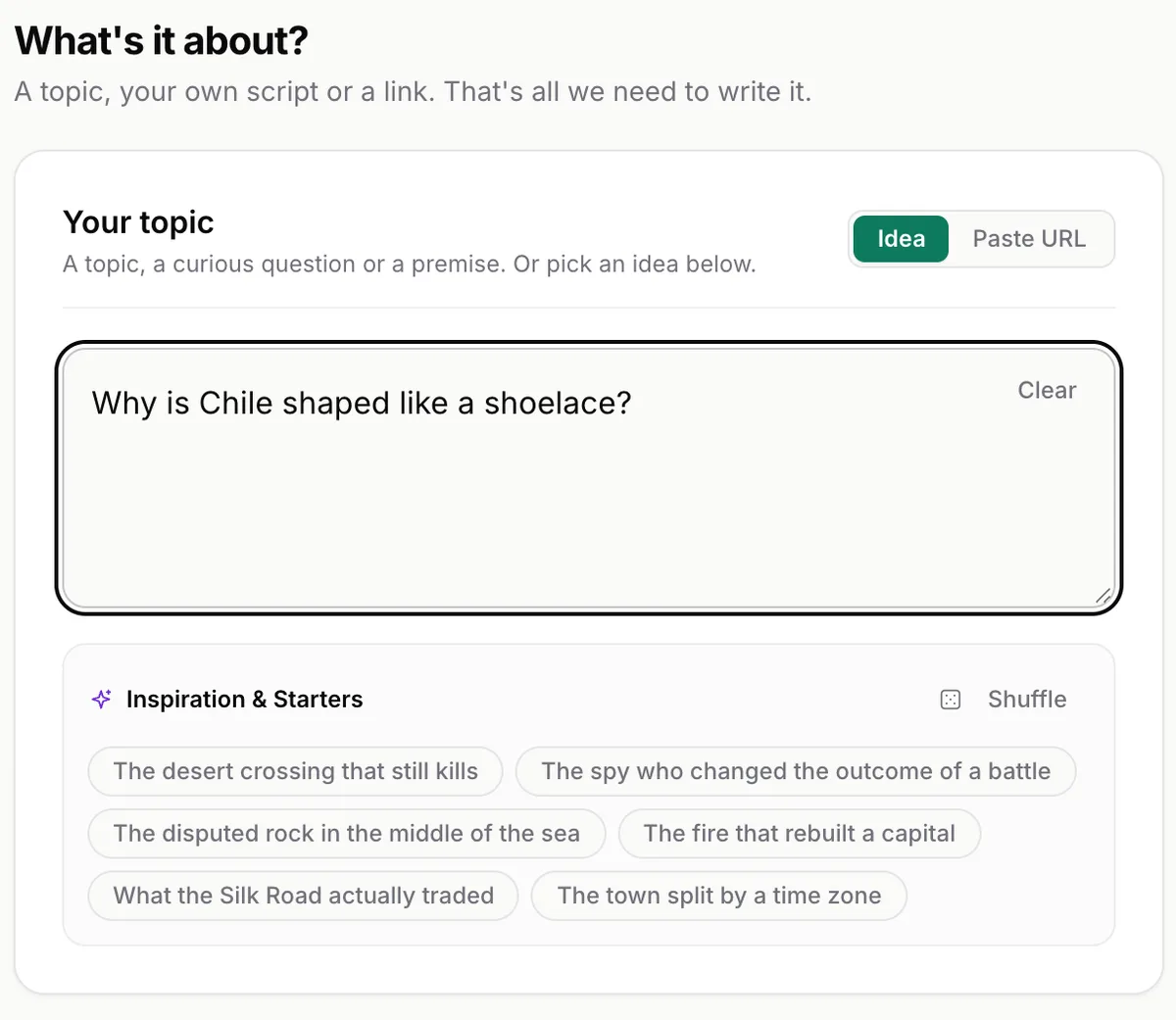
The check before moving on has two halves. Would someone type this question into a search box, and can one video answer it? If nobody searches for it, the video earns every view from scratch. If the question is too big, the video wanders. When the box stays empty, the faceless video ideas generator turns one niche into six concepts with titles, hooks and visual direction, and it costs nothing.
Step 2: Write the script#
The script decides everything downstream. Voice, scenes and captions all follow it, so this is the step where your time buys the most. AI writes a full draft in one pass. What you add is one read-aloud pass before it is voiced: cut the lines that repeat what the picture already shows, keep the lines that add a fact, a number or a turn.
The opening line deserves its own pass. How to write a hook for a faceless video works through the eight-word rule and scores five openings against it, and the hook generator writes hook directions for your topic with the evidence for each one right after the line. For structure, the 15 beats of a high-retention script lays out the skeleton. The script outline generator builds a timed beat list for a topic, and the script timer checks that the script fits the length you want before you render anything.
Here is the worked example, made with Unfaced in the paper notes look of the stick figure style:
Its subject is the failure this step exists to prevent: a script that sounds written, so viewers leave. In this style the drawings and the words on screen are matched to the narration line by line, which is what the check in Step 5 compares.
Step 3: Give it a voice#
Narration carries the tone the script cannot show, and viewers notice it first when it is wrong. In Unfaced the voice comes back with the draft, and the editor takes plain-word requests ("change voice" is one of the suggestions), so trying a second voice is a render away. A voice picked for a channel usually stays for the whole series, which is worth one extra listen before you commit.
Standalone voice tools price by credits. The ElevenLabs pricing page listed a free tier with 10,000 credits a month, Starter at $6 a month, Creator at $22 and Pro at $99 when we checked on October 23, 2026, with a first-month discount running at the time. On any voice tool, check two things before paying: whether the license covers commercial use, and whether the plan's credits cover the length you actually produce.
Two checks sit between the voice and the visuals. Listen once end to end for names and numbers, and read what synthetic narration means for a monetized channel in AI voices and YouTube monetization. Some platforms also require a label on synthetic media, and AI disclosure on YouTube, TikTok and Instagram walks through when one is needed.
Step 4: Build the visuals#
Visuals are the biggest production job in a traditionally made video and the biggest chunk of work AI takes off the table. Two routes cover almost everyone. The first picks a look and lets the tool plan the scenes: in Unfaced you choose the style and the shape (9:16 or 16:9) before any words are written, and the draft comes back with the scenes already built against the narration.
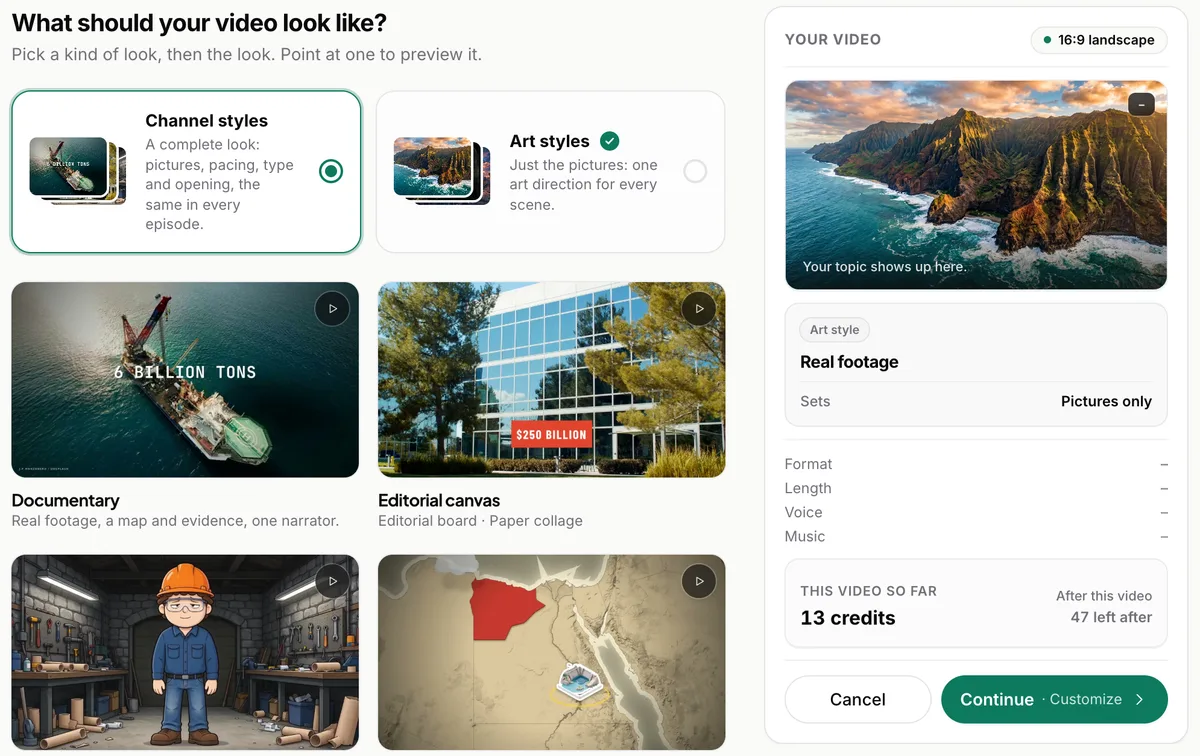
The second route assembles stock media around the script, which is the model most text-to-video tools sell (priced in the next section). Either way the checks are the same, and they are what separates a readable video from one that gets skipped:
- Every label sits on the thing it names and fades after it has been read.
- Every number prints with its unit and says what it counts. If the narration does not say it, the screen does not show it.
- No text covers the subject of the shot. A caption over the thing the beat is about reads as a defect in every frame check we run.
The animated map video guide works through these label and number rules on real examples, since maps carry more on-screen text than any other style.
Step 5: Review before anything goes out#
This is the step the whole workflow is built around: nothing publishes until a person approves the finished video. In Unfaced the draft is a video you watch end to end while it is still private, and publishing is a button you press on purpose. The editor below is where the last changes happen.
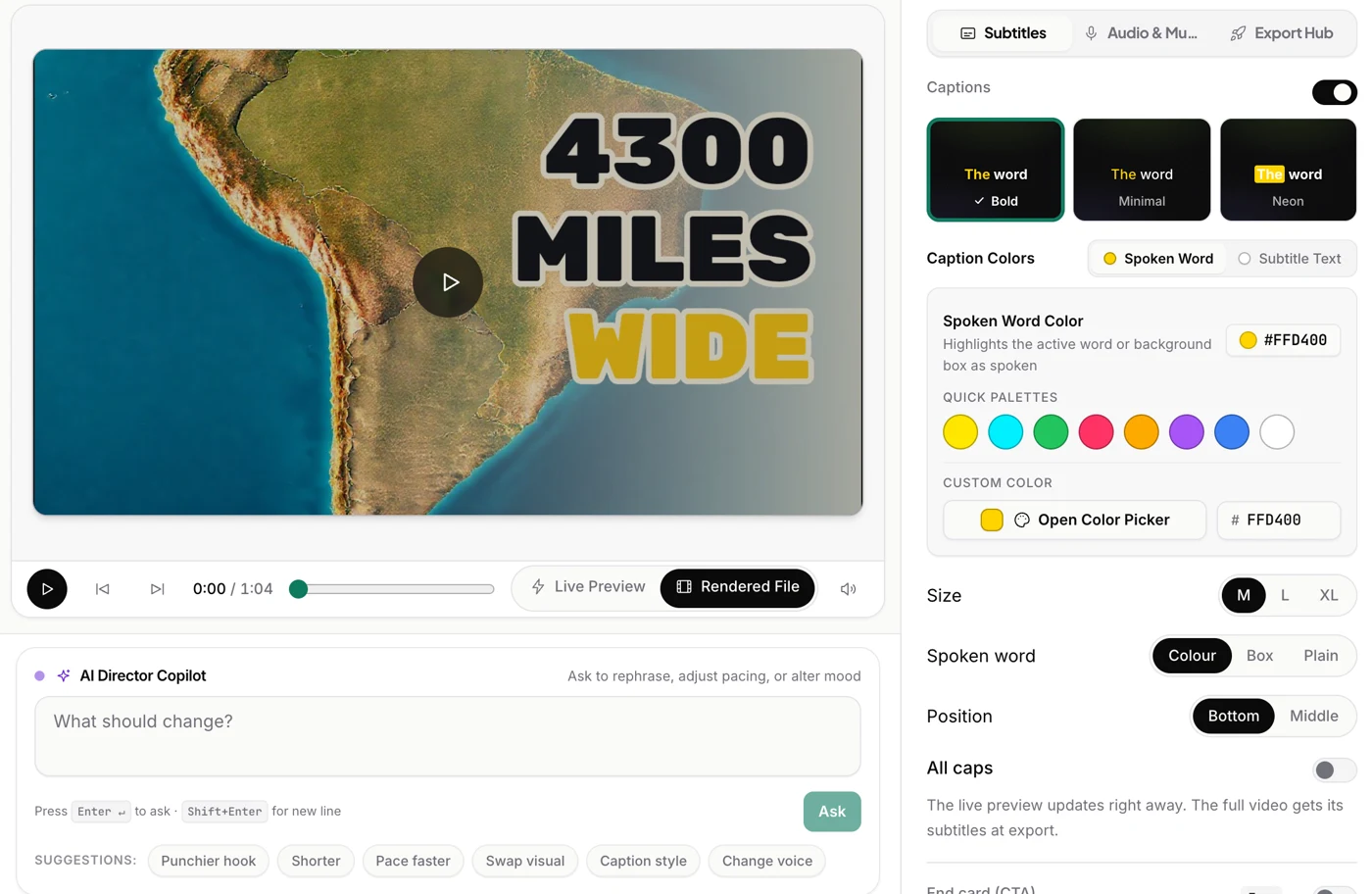
The review is one pass in a fixed order:
- Watch the whole draft without stopping. The first viewing is for pacing and the story.
- Check every piece of on-screen text against the narration. One frame per second is enough to catch a label on the wrong place or a figure the voice never says.
- Check the claims: names, dates, figures. AI drafts come out confident, and confidence says nothing about whether the number is right.
- Check the promise: the title and the thumbnail say what the video delivers.
- Check the rules: a disclosure where one applies, and nothing on screen you do not have the rights to.
After publishing the review continues with data. The retention graph shows the second viewers leave, and how to read a retention graph goes through what the shape means. On Unfaced every YouTube episode gets a hook score built from its retention and its transcript, so the next opening can be compared against the last one instead of guessed at.
Where humans must stay in the loop#
Four places, and they do not move as the tools improve:
- The claim. Every figure, name and date is a statement your channel stands behind. One wrong number undoes the trust a series builds.
- The rights. Footage, photos, music and fonts come with terms. Anything you did not draw yourself needs a license that covers a video you monetize.
- The platform rules. Disclosure requirements and inauthentic-content policies change, and they apply to the channel, not to a single upload. The inauthentic content policy guide and the disclosure guide are the two pages to keep nearby.
- The call to publish. A draft can be technically clean and still not earn the title it carries. Watching it once as a viewer settles that question better than any score.
None of these take long. The claim check is one read, the rights check is one look at where the assets came from, and the platform check is one policy page read once. They are also the part no tool can do for you, which is why the approve step stays a human step.
Time and cost per video#
The honest version of "how long does this take" has two sides: how the tool meters its work, and how much of your time goes in. The machine side is one run per draft. Your side is the read of the script and the watch of the finished video.
| Step | What the tool does | Your hands-on work | What it costs |
|---|---|---|---|
| Idea | Suggests topics, outlines and starters | Write one question and check that someone would type it | Free (the ideas generator costs nothing) |
| Script | Writes the full draft | One read-aloud pass before voicing | Included in a plan, or whatever assistant you already use |
| Voice | Narrates the script | One listen for names and numbers | Included, or a voice tool from $6 a month |
| Visuals | Plans the scenes and renders them | Look at every frame that carries text | Included (credits pay per video) |
| Review | Renders the final file | One full watch plus the text check | Free |
What the money buys, read from each vendor's own pricing page on October 23, 2026:
| Route | What it covers | Price |
|---|---|---|
| All-in-one (Unfaced, the tool we make) | Script, voice, visuals, captions and approval before publish. Credits pay per video: a 45-second short costs 19 credits, a 10-minute episode 126. | Free with 60 credits to start, first video in 1080p with no watermark. Starter $19 a month (500 credits, about 26 shorts or six 5-minute episodes), Creator $29 (1,200 credits), Pro $59 (2,500 credits). Billed yearly: $180, $288, $588. Prices include tax. |
| Voice only (ElevenLabs) | Narration. You bring the script and the visuals. | Free with 10,000 credits a month. Starter $6, Creator $22, Pro $99 a month. |
| Stock text-to-video (Pictory) | A video from a script or a link, built on stock media, sold in video minutes. | Starter $25 a month billed yearly ($29 month to month), 2,400 video minutes a year. Professional $35 a month billed yearly, 7,200 minutes a year. |
The three meters do not match: credits per video, credits per month, video minutes per year. Unfaced's own page says what a credit buys and marks its video counts as estimates, and the equivalent lines on the other two pages are the ones to read before paying. All three have a free way in: the first video on Unfaced is free in 1080p with no watermark, ElevenLabs keeps a free tier, and Pictory runs a 14-day trial.
Choosing the tool: what to check#
Price is the last comparison, not the first. The questions that decide whether a tool fits your workflow are these:
- Does the cost appear before the render? Unfaced shows the credit cost before anything renders.
- Are the script, the scenes and the voice still editable after the draft comes back? In Unfaced you edit the script, swap a scene or discard the draft.
- Can you change the voice and the style without starting over?
- Does publishing require your approval, every time?
- Does the plan's meter match your production: credits per video, videos per month, video minutes per year?
- Is the output yours? On Unfaced every video is yours to download, edit and post anywhere.
- What happens when a render fails? Unfaced refunds failed renders automatically.
- Does the shape you need exist? Shorts are 9:16, YouTube episodes 16:9, and the captions come with both.
If you want to walk the workflow once, make a first video in the studio: no credit card, the first video is free in 1080p with no watermark, and nothing publishes without your approval. The examples page has finished videos in every style, including the demo above, and how to start a faceless YouTube channel covers the channel-level decisions that come after the first video.